

Brands
Shipped Brands with their own context, records, mailboxes and analytics, in the web app, the REST API and the MCP server.
Many companies market more than one business. Northpeak runs northpeak.example and summitly.example, and also makes games, on the web, on phones and on TVs. Separate workspaces would mean connecting every tool twice and inviting every person twice, and nobody could see everything at once. So a workspace can hold brands instead.
Each brand has its own website (its point of truth), its own context for agents, and its own sequences, lead lists, domains and mailboxes. Brands share only your team, your billing and the tools you connect, so nobody switches accounts or keys. Everything else, including leads and the unsubscribe list, belongs to one brand. You can also keep a person or an API token to some brands, so a brand’s agency or contractor sees only that brand.
Add a brand
Section titled “Add a brand”Open the brand switcher at the top of the sidebar, choose Add a brand and give its name, website and where it ships (web, iOS, Android, TV and so on). Add its other domains on its page (Company → Brand while you’re in it), such as an app or help site. Inside a brand you only see that brand: other brands are in the switcher. A workspace without brands works exactly as before. Anyone but a viewer can add a brand, and so can an API token or connected AI app that can make changes (the context.manage scope); only the workspace’s own name and URL need workspace.manage.
Also on its page, under Links, add everywhere else the brand lives: its App Store and Google Play listings, TV app stores, the Chrome Web Store, Steam, socials and docs. Paste the address and Outflare works out what it is (apps.apple.com is the App Store); add a label such as “Fire TV” where it helps. Agents read the links with the brand’s context. With your own Geonode account connected, Outflare also reads the brand’s website and suggests the socials and listings it links to, for you to add or dismiss (Finding a brand’s links).
With your own Geonode connection, Outflare also reads the brand’s website when you add it (the home page, then up to 40 of the pages it links to: products, pricing, features, integrations, about, use cases, customers and docs) and asks your own AI model what the business does. The result, What the website says on the brand’s page, is a summary, the industry, and bullets for products, services, features, integrations, capabilities, who it serves and use cases, each linked to the page it came from. Edit any of it, or press Read the website again after a redesign. Agents read it with the brand’s context, and AI visibility drafts its questions from it. Geonode and your AI provider bill your own accounts; without a Geonode connection the brand’s page says which connection to add.
Outflare also fills in the brand’s logo and main colour from its own website, under Company → Logo and colours: when you add the brand, when its website changes, and when you open that card with no logo yet (or press Find on website). OutflareBot reads the home page, obeying robots.txt, and takes the logo the site names for itself, or else its icon, plus its theme colour. It only fills in what is empty and never replaces a logo or colour you set. This needs no connection or key.
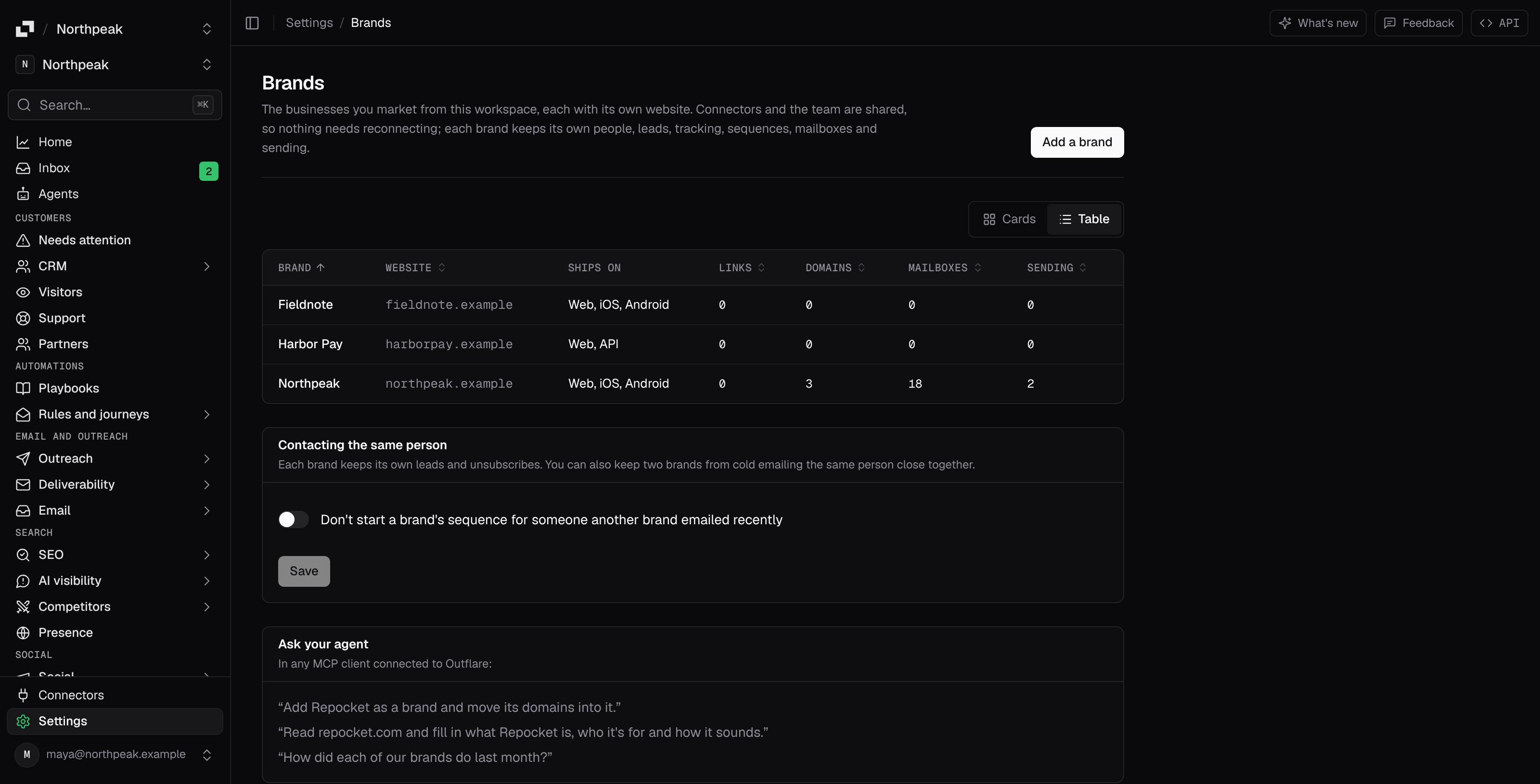
Settings → Brands lists every brand in the workspace, as cards or as a table you can sort (it remembers which you picked). Open it from the switcher with Manage brands. It is also where you add, archive and restore brands, move records between brands and set the rule for contacting the same person.
Tell agents about it
Section titled “Tell agents about it”Each brand’s page has About: what it is, who it’s for, goals, voice, rules and notes. Agents read it on top of the company’s context:
- Rules add to the company’s rules and never replace them, so “Never mention Northpeak” for Summitly keeps every company-wide rule.
- The other fields win over the company’s where you fill them in, such as a friendlier voice for a consumer app.
- How our brands relate, on the Company page, says what the brands share and when one may mention another.
Memories belong to the company or to a brand. An agent working on Summitly reads the company’s memories and Summitly’s, never Northpeak’s. See Memory and status.
Decide what belongs to each brand
Section titled “Decide what belongs to each brand”Every sending domain, mailbox, ad account and analytics site belongs to exactly one brand. Brands share only the team, billing and connections; nothing else is shared between them. Something new goes to the brand you’re working in, or, when Outflare can’t tell (an ad account found by a sync, say), to your first brand. Move it to another brand from Settings → Brands, or with POST /brands/{brand}/add. A domain brings its mailboxes.
A brand’s mailboxes send for any of that brand’s sequences, and never for another brand’s, so Summitly never emails from a Northpeak domain.
What a brand is for (its offer, its audience) goes in its context, who it sells to in ideal customer profiles, and each sequence has its own switch and daily send limit. Outflare used to have projects between a brand and its sequences; they were removed (Projects were removed).
See one brand at a time
Section titled “See one brand at a time”Like a project in PostHog, you work on one brand at a time. The brand picker sits at the top of the sidebar, under your workspace (on a phone, in the top bar), and narrows every page to that brand: sequences, lead lists, mailboxes, domains, agents, playbook automations, connectors, SEO, analytics, reports, ad platforms, site audits and search. There is no view across all brands: Outflare opens on the brand you picked last, or your first brand.
The brand is part of every link, after the workspace: app.outflare.ai/acme/summitly/seo. A link you share opens on the same brand and the same screen (see A link to any screen), and older links ending in ?brand=summitly still work. Pages for the whole workspace, such as Members and API tokens, have no brand in their link. Because handles sit in links, a brand’s handle can’t be the name of a page or an area, such as seo, outreach or members.
Switching brand reloads the page you’re on with that brand’s records. If you had something open that belongs to the other brand, such as a site audit or a sequence, you go back to that page’s list for the new brand.
SEO and analytics read through a connection every brand shares, such as Ahrefs or Google Search Console, count each website for the brand it belongs to (see Analytics by brand). So a brand only sees the keywords and traffic of its own websites.
You always work in one brand, and you see only that brand. Home, infrastructure, warm-up, mailbox health, leads, allocation, meetings and deals count nothing from other brands.
Move records to another brand
Section titled “Move records to another brand”Nothing sits outside a brand, so there is nothing to take out of one: move a domain, mailbox or ad account to the brand it belongs to instead. A domain brings its mailboxes. Agents do the same with add_to_brand.
Connect a tool once for every brand
Section titled “Connect a tool once for every brand”Connectors belong to the workspace, so you connect Google Analytics, Search Console, your verification service or your ad accounts once and every brand uses them. Each brand still reads its own GA4 property, Search Console site or ad account on that one connection (see below).
You can narrow it down on the Connectors page, where the Used by column says who uses each connection. Open More → Choose who uses it to pick:
- Shared from the workspace: every brand, or only the brands you tick.
- One brand’s own: for a brand with an account of its own, say Summitly’s own Plausible. Only that brand uses it, and it takes the place of the shared Plausible for Summitly alone. The other brands keep the shared one.
With one brand picked, Connectors lists what that brand uses and marks each one as Shared from workspace, Split by site or the brand’s own. A split connection (Google Analytics, Search Console, ad accounts) imports nothing into a brand wholesale. Each of its sites or accounts belongs to one brand, and More → Choose {brand}’s sites picks which ones. Disconnect for every brand removes the connection from the whole workspace, so to stop a site counting for one brand, choose its sites instead. When you connect something new there, choose Every brand or Only Summitly. Someone kept to some brands only sees the connections their brands use.
In the API, every connection has brand_id (set on a brand’s own) and brand_ids (the brands a shared one is shared with; empty means every brand). GET /v1/workspaces/{ws}/integrations?brand=summitly lists what a brand uses. Set who uses a connection with brand_id or brand_ids on POST or PATCH /integrations, or ?brand= on the sign-in link. The MCP tools are list_integrations and update_integration.
Connections with no brand
Section titled “Connections with no brand”A connection that belongs to one brand, such as Google Tag Manager, shows its data in no brand until you say whose it is. Connectors lists each one with what tells you whose it is: the account it signed in to, what the provider reports (Tag Manager’s accounts, its containers with their GTM ids and the sites they tag, or a Cloudflare account’s zones), who connected it and when, and the connection it was signed in together with. When the details point to a brand, Outflare suggests it and says why, for example “a site it tags is on that brand’s domain”. Pick the brand next to it, or More for the other choices. A connection made before Outflare read these details shows Read its accounts and sites from the provider, which signs in again and changes nothing at the provider.
In the API, GET /v1/workspaces/{ws}/connections/unassigned returns signed_in_as, details, connected_at, connected_by, connected_with, suggested_brand_id and suggested_because for each.
See every domain in one list
Section titled “See every domain in one list”A workspace sets up domains in several places: each brand’s website, SEO sites, website tracking, cold email sending domains, Lifecycle email domains and tracking domains for links. GET /v1/workspaces/{ws}/domains lists each domain once, by its registrable name, so www.acme.example and mail.acme.example both show under acme.example. Each entry has:
uses: every place the domain is set up, with itspurpose(website,seo,site_tracking,cold_email,lifecycle_emailortracking_links), the exacthost, itsstatusand theidthat opens it in its own part of the app.needs_attention: the purposes with a use still pending or failing, such as a sending domain whose DNS records aren’t in place yet.record_id: the company record with this domain, when there is one.
Add ?brand=summitly for one brand’s domains, or ?purpose=cold_email for one kind. Someone kept to some brands sees their brands’ domains and the shared ones. It needs scope workspace.read; the MCP tool is list_workspace_domains.
To look up a domain someone else owns (is it free mail, a disposable address, a company?), use GET /v1/workspaces/{ws}/domain-lookups/{domain}. It is the same lookup as before, under a clearer name.
Analytics by brand
Section titled “Analytics by brand”Each site in your analytics tools, such as a GA4 property, a Search Console site or a PostHog project, belongs to one brand: the one you picked for it, else the brand whose website it is, else the brand of the connection it was read through, else your first brand. A site is a brand’s website when its domain is one of the brand’s domains or a subdomain of one, so sc-domain:summitly.example and app.summitly.example are Summitly’s. So when one Google sign-in can read the Search Console properties of several of your brands, each property’s clicks and pages show only under its own brand, even if nobody picked. Pick or change a site’s brand yourself (PUT /v1/workspaces/{ws}/analytics/{id}/site-brand); auto goes back to the brand whose website it is.
You connect Google Analytics (or any analytics tool) once for the workspace, and every property ends up in one of two places: a brand, or Don’t import. Outflare suggests a brand for each and says why (“Matches summitly.example”, “Name matches”), and nothing is imported until every property has a choice. A property no brand fits can start one: New brand from this site makes a brand named after it, with its domain as the website. Outflare never makes a brand on its own.
With one brand picked and no analytics counting for it yet, the Analytics page offers Pick from Google Analytics: it uses the connection you already have, with no second sign-in, and lists only that brand’s properties and the ones no brand has yet. Someone kept to some brands, or their API token, can only place properties in their own brands, never another brand’s property. Campaigns inside a brand are told apart with UTM tags on their links, not with separate properties.
Keep brands from emailing the same person
Section titled “Keep brands from emailing the same person”Each brand has its own leads and its own unsubscribe list, so the same person can be a lead of two brands, and an unsubscribe from one brand doesn’t stop the other. You can keep two brands from cold emailing the same person close together: open Settings → Brands, turn on Contacting the same person and choose how many days to wait (1 to 365).
With the rule on, a brand’s sequence skips anyone another brand emailed within that many days. Their enrollment shows as blocked with the reason other_brand:northpeak, naming the brand that got there first. The rule checks only first emails, so follow-ups already under way carry on, and sequences shared by every brand don’t count. To check before you enroll, call POST /recipients/check with brand.
Reports by brand
Section titled “Reports by brand”Sending reports, Cost per meeting, attribution and the email overview show only the brand picked in the sidebar. In the API they are brand routes: GET /v1/brands/{brand}/reports, /outcomes/report, /outcomes/export, /email-overview and /attribution/.... A send, reply or meeting counts for its sequence’s brand. Spend tied only to a mailbox or domain counts for that mailbox’s or domain’s brand.
The audit log and the events feed take ?brand=, and every event and webhook payload carries brand_id when the changed record has a brand. A webhook can be kept to one brand: pick it under Which brands in Settings → Webhooks, or send "brand": "summitly" when you create it.
Keep people and tokens to some brands
Section titled “Keep people and tokens to some brands”Owners and admins always see every brand. An operator or viewer can be kept to some brands: in Settings → Members, pick their brands in the Brands column, or pick them on the invite. An API token can be kept to one brand: choose it under Which brands when you create the token ("brand": "summitly" in the API). An MCP connection is a token, so the same goes for an agent.
Someone kept to some brands:
- sees those brands’ sequences, lists, mailboxes, domains, inbox, overview and analytics, plus anything shared;
- changes only their brands’ records, so shared records are read-only to them;
- makes new records in their brand;
- can’t use what needs every brand, such as workspace settings and connecting tools. The app hides those pages, and the API answers
403. In the API reference, these endpoints aren’t markedbrand_limited.
Changing someone’s brands is in the audit log as member.brands_changed.
Archive or delete a brand
Section titled “Archive or delete a brand”On the brand’s page (Company → Brand), the ⋯ menu has Archive and Delete brand.
Archive hides the brand from the switcher and every picker and keeps all its records.
Delete brand asks you to type its name, then deletes the brand and everything in it: its people, lists, sequences, mailboxes, domains, sites, connections made for it, settings and history. Nothing moves to another brand, and it can’t be undone. The brand leaves the switcher at once, you move to another brand, and the rest is cleared in the background. Only owners and admins can delete a brand. You can’t delete your only brand, or one that a member or invite is limited to: give them another brand first. With the API, DELETE /v1/workspaces/{ws}/brands/{brand} (scope workspace.manage).
API and MCP
Section titled “API and MCP”What belongs to a brand lives under /v1/brands/{brand}/, where {brand} is the brand’s id (GET /v1/workspaces/{ws}/brands lists them). Only what the whole workspace shares, such as members, API tokens, connections and billing, stays under /v1/workspaces/{ws}/. An older workspace route for brand data answers 410 with the error code route_moved and names its brand route. MCP tools that read or change a brand’s data take brand.
| What | REST | MCP tool |
|---|---|---|
| List brands | GET /v1/workspaces/{ws}/brands |
list_brands |
| Add or edit one, including its links | POST /brands, PATCH /brands/{brand} |
create_brand, update_brand |
| Links found on its website | POST /brands/{brand}/links/discover, GET /brands/{brand}/link-suggestions |
find_brand_links, list_brand_link_suggestions, add_brand_link, dismiss_brand_link |
| Logo and colour from its website | POST /brands/{brand}/look/find |
find_brand_look |
| A brand’s own context | GET/PATCH /brands/{brand}/context |
get_brand_context, update_brand_context |
| Company and brand context together | GET /context?brand=summitly |
get_context with brand |
| Move records to a brand | POST /brands/{brand}/add |
add_to_brand |
| Keep a member to some brands | PATCH /members/{user} with brand_ids |
(people only, in the app or API) |
| A token for one brand | POST /tokens with brand |
(in the app or API) |
| The cross-brand contact rule | GET/PATCH /brand-rules |
get_brand_rules, set_brand_rules |
| A brand’s reports | GET /v1/brands/{brand}/reports, GET /v1/brands/{brand}/outcomes/report |
get_report, get_outcomes_report |
| Analytics sites by brand | GET /analytics/site-brands, PUT /analytics/{id}/site-brand |
list_analytics_site_brands, set_analytics_site_brand |
{brand} is the brand’s handle (such as summitly) or its id. Brand data is under /v1/brands/{brand}/…. The few workspace lists that take ?brand= accept a handle or id, or none for records in no brand. Set OUTFLARE_BRAND on the MCP server to make one brand its default.
curl -X POST https://app.outflare.ai/v1/workspaces/$WS/brands \ -H "Authorization: Bearer $OUTFLARE_TOKEN" -H "Content-Type: application/json" \ -d '{"name": "Summitly", "website": "summitly.example", "platforms": ["web", "ios", "android"], "links": [{"url": "https://apps.apple.com/app/summitly/id1234567890"}, {"url": "https://www.amazon.com/dp/B0EXAMPLE", "kind": "tv_app", "label": "Fire TV"}]}'Coming next
Section titled “Coming next”- Drafting a brand’s context by reading its website.