

Outcomes and cost per meeting
Shipped Meetings, deals, a spend ledger and cost per meeting, in the web app, the REST API and the MCP server.
Sends and replies say whether outreach is working. What a team actually needs to know is what each meeting cost, and which motion and which sequence got it cheapest. The Outcomes page answers that: meetings and deals for a period, everything you spent to get them, and the cost per reply, per meeting, per held meeting and per won deal, for the whole workspace or by project or sequence.
Outflare records costs; it never bills. You pay your providers directly.
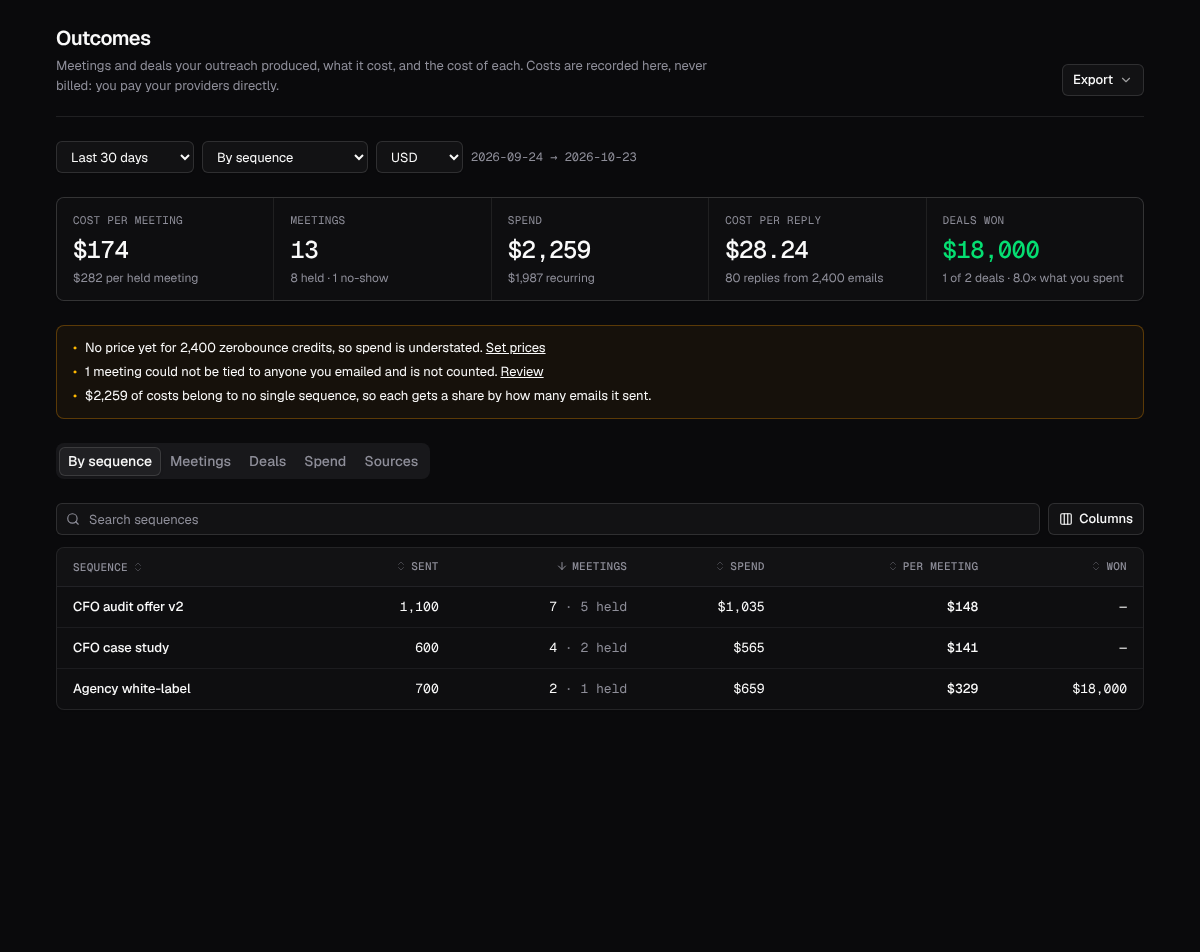
Where meetings come from
Section titled “Where meetings come from”- Calendars and booking tools. Connect Google Calendar, Outlook, Calendly or Cal.com under Connectors (see Calendars and HubSpot). Each is read every 15 minutes. Only events with a lead among the attendees are stored; the rest of your calendar is never copied, and nothing is changed there.
- HubSpot. Meetings logged in HubSpot, with their outcome (completed, no-show, canceled).
- By hand or by an agent. Log meeting on the Meetings tab,
POST /v1/workspaces/{ws}/meetings, or thelog_meetingMCP tool.
The same meeting seen in two places, say Calendly and Google Calendar, is counted once: two meetings with the same lead that start within 15 minutes of each other are treated as one.
How a meeting is tied to outreach
Section titled “How a meeting is tied to outreach”- An attendee is a lead you emailed. The meeting counts for the last sequence that emailed that lead before the booking, and for that sequence’s project.
- Otherwise, an attendee works at a company you emailed. If nobody on the invite is a lead but one of them shares a company domain with a lead you emailed (never a free-mail domain such as gmail.com), the meeting counts for that lead’s sequence. Your own domains are ignored, so a colleague on the invite is never mistaken for a prospect.
- Otherwise it is not from outreach. It is listed, and the page tells you how many there are, but it does not count for any sequence.
Fix any of them on the Meetings tab: move a meeting to another sequence or project, mark it not from outreach, held, no-show or qualified. A choice you make by hand is never overwritten by a later sync.
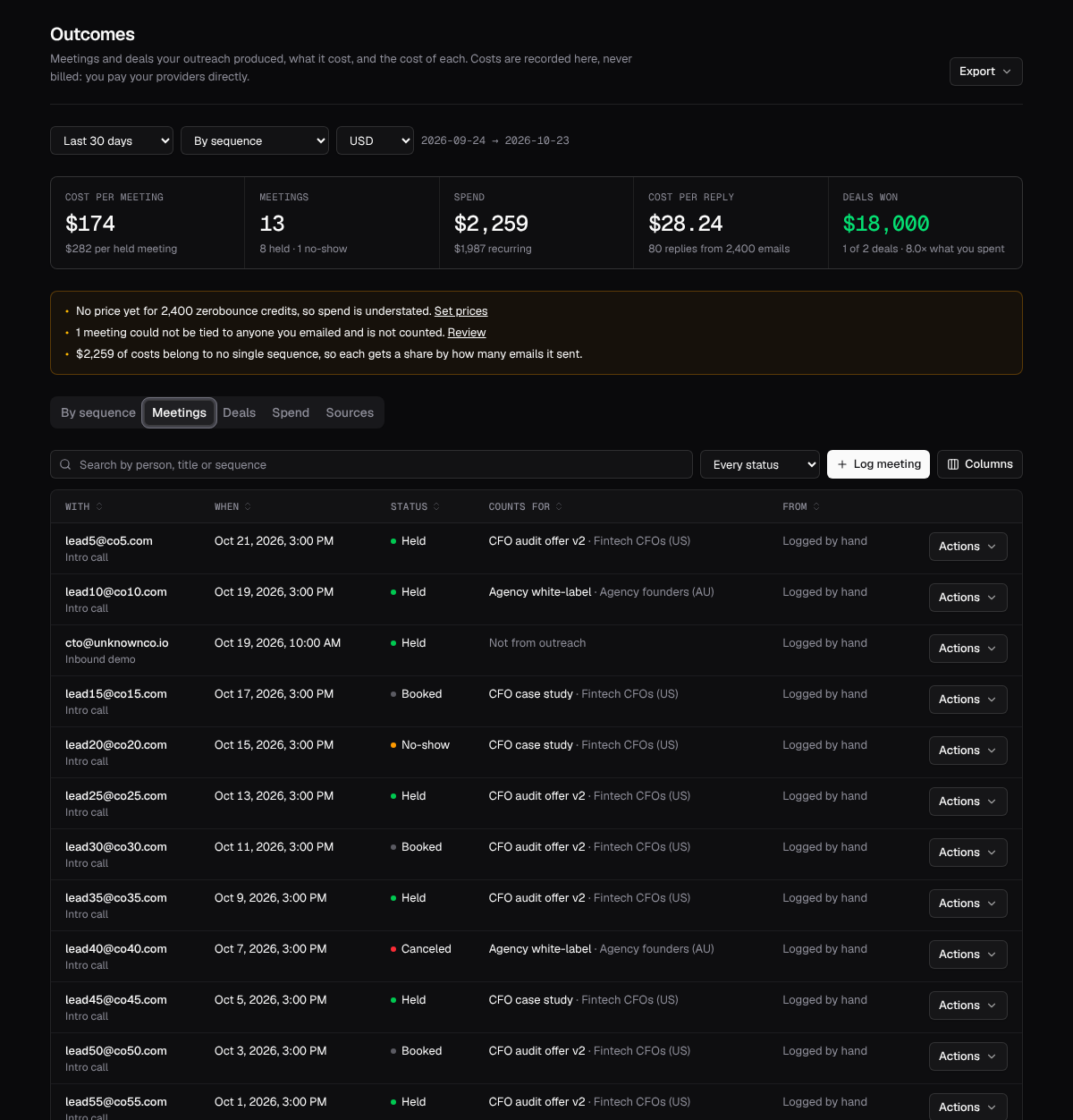
Deals are read from HubSpot: name, stage, open, won or lost, amount and close date, linked to the lead’s most recent meeting. HubSpot stays the source of truth; Outflare keeps a copy for reporting and refuses edits to the fields HubSpot owns. Without a CRM, log deals by hand.
Set push_meetings on the HubSpot connection (see Settings) and meetings booked from outreach are added to HubSpot too, with the contact created or updated by email. It is off by default. Outflare is not a CRM and never will be.
The spend ledger
Section titled “The spend ledger”Every charge is one row: what it was for (lead data, verification, mailboxes, domains, sending, software, people, ads, other), the provider, the amount or the units used, and when. Tag it with the project, sequence, mailbox or domain it was for. Each row also records who caused it: a person, an API token or an agent.
- Money or units. Record
$99for an Apollo export, or2,400 creditsfrom ZeroBounce when you don’t know the price yet. Set a price per unit on the Spend tab and every report includes those units, marked estimated. Until then the page warns that spend is understated. - Recurring costs. Mailbox seats, a data subscription or an SDR’s time, monthly or yearly. Each is spread evenly over the days it was active, so a 30-day report carries 30 days of it.
- Idempotent. Send a
ref(an invoice number, a batch id) and recording the same charge twice keeps the first one, so scripts and agents can retry safely.
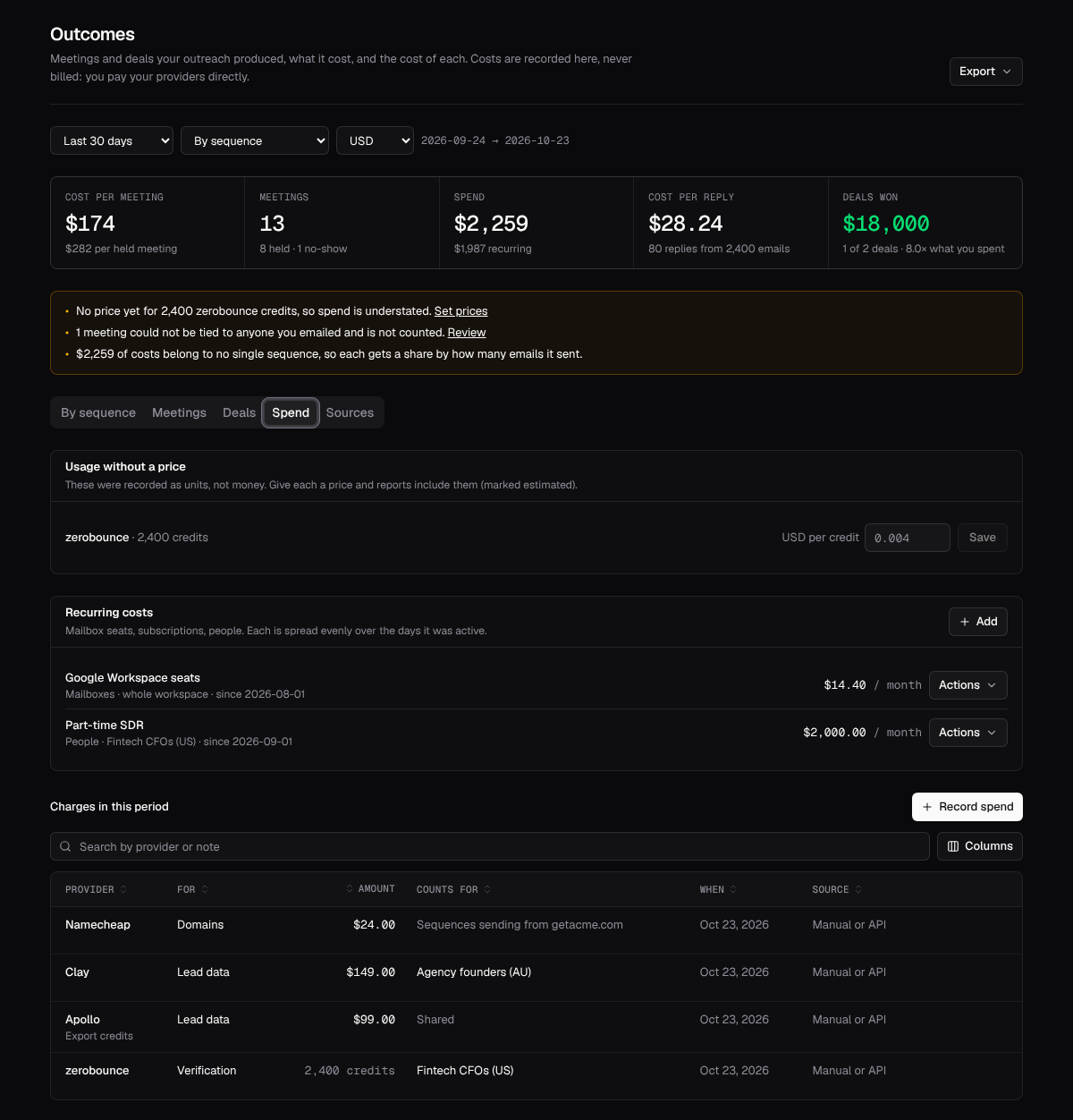
How costs are shared
Section titled “How costs are shared”- A charge tagged with a sequence or a project counts for it.
- A charge for a mailbox or a domain follows the sequences that sent from it, split by their emails.
- Everything else is shared by each sequence’s or project’s share of emails sent.
Reports never convert currencies. Pick the currency at the top of the page; spend in other currencies is listed separately so it is never silently dropped.
Reports and export
Section titled “Reports and export”# Cost per meeting by sequence, this monthcurl "https://outflare.example.com/v1/workspaces/$WS/outcomes/report?group_by=sequence&from=2026-10-01" \ -H "Authorization: Bearer $OUTFLARE_TOKEN"group_by is none, project or sequence; filter with project_id or sequence_id; from and to are dates and include the whole of both days (the last 30 days by default). Each row has emails sent, replies, meetings, held meetings, no-shows, qualified meetings, deals, deals won, pipeline and won amounts, spend broken down by category, and the cost of each. The response also lists unpriced usage, meetings not tied to outreach, and notes that explain any number that is estimated or shared.
For a warehouse, export any dataset as CSV or NDJSON (up to 100,000 rows):
curl "https://outflare.example.com/v1/workspaces/$WS/outcomes/export?dataset=meetings&format=ndjson" \ -H "Authorization: Bearer $OUTFLARE_TOKEN" > meetings.ndjsondataset is meetings, deals, spend or report. CSV cells that a spreadsheet would run as a formula are escaped.
Recording spend from code
Section titled “Recording spend from code”curl -X POST https://outflare.example.com/v1/workspaces/$WS/spend \ -H "Authorization: Bearer $OUTFLARE_TOKEN" -H "Content-Type: application/json" \ -d '{"category": "verification", "provider": "zerobounce", "units": 2400, "unit_name": "credit", "project_id": "'$PROJECT'", "ref": "zb-batch-118"}'A new charge returns 201; one whose ref was already recorded returns 200 with the existing row.
| Method | Path | Does |
|---|---|---|
| GET | /v1/workspaces/{ws}/outcomes/report |
Cost per meeting and the rest, for the workspace or by project or sequence |
| GET | /v1/workspaces/{ws}/outcomes/export |
Meetings, deals, spend or the report as CSV or NDJSON |
| GET | /v1/workspaces/{ws}/outcomes/syncs |
Each connected source: last run, last success, last error, changes |
| POST | /v1/workspaces/{ws}/outcomes/syncs/{id}/run |
Sync one source now |
| GET, POST, PATCH, DELETE | /v1/workspaces/{ws}/meetings |
List, log, correct and delete meetings |
| GET, POST, PATCH, DELETE | /v1/workspaces/{ws}/deals |
List, log, update and delete deals |
| GET, POST, DELETE | /v1/workspaces/{ws}/spend |
The ledger |
| GET, POST, PUT, DELETE | /v1/workspaces/{ws}/spend-recurring |
Recurring costs |
| GET, PUT, DELETE | /v1/workspaces/{ws}/spend-rates |
Price per unit, and usage still without one |
Reading needs outcomes.read; logging meetings, deals and spend needs outcomes.manage. Operators get both and viewers can read. Every change is in the audit log.
For agents
Section titled “For agents”The MCP server has get_outcomes_report, list_meetings, list_deals, list_spend, list_recurring_spend, list_spend_rates and list_outcome_syncs to read, and log_meeting, update_meeting, log_deal, update_deal, record_spend, set_spend_rate, add_recurring_spend, delete_spend_entry and sync_outcomes_now to change. An agent that buys something on your behalf, a list or a batch of verifications, should call record_spend with a ref, so its cost shows up against the project it was working on. See MCP server.