

Sending domains
Shipped Domain list and detail pages, daily DNS and blocklist checks, issues with fixes, per-domain sending stats, and pausing and daily caps enforced by the policy check. Inbox placement from warm-up is summed per domain; reputation data from the mailbox providers themselves comes later.
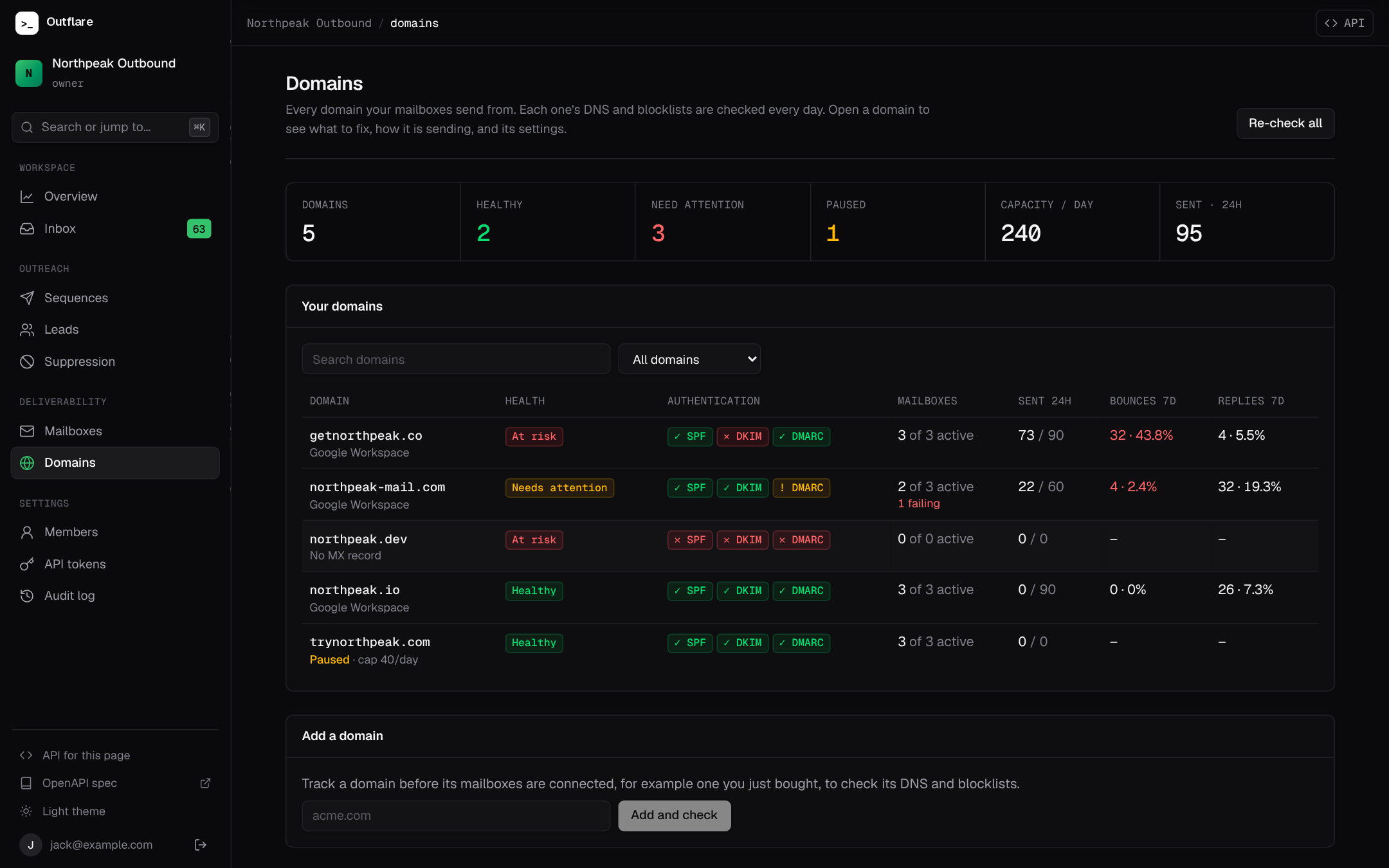
Cold email is won or lost per domain. Mailbox providers judge a domain on its authentication records, its blocklist standing and how its mail is received, so a single broken record or a bad list can hurt every mailbox on it. The Domains tab in the web app puts all of that in one place.
Where domains come from
Section titled “Where domains come from”A domain is added on its own the first time you connect a mailbox on it. You can also add one by hand, for example a domain you just bought, to check its DNS before you buy inboxes on it: Domains → Add a domain, or:
curl -X POST https://outflare.example.com/v1/workspaces/$WS/sending-domains \ -H "Authorization: Bearer $OUTFLARE_TOKEN" -H "Content-Type: application/json" \ -d '{"domain": "acme.com"}'acme.com, @acme.com, https://acme.com/pricing and [email protected] are all read as acme.com. A domain can be removed only once it has no mailboxes.
What is checked
Section titled “What is checked”Each domain’s DNS and blocklist standing is checked when it is added and again every day. To check right after you change a record, use Re-check DNS on the domain, or POST /v1/workspaces/{ws}/sending-domains/{domain}/check (or .../sending-domains/check for all of them).
| Check | Looks for |
|---|---|
| MX | Where replies are delivered, and which provider hosts the domain (Google Workspace, Microsoft 365 or other). |
| SPF | Exactly one v=spf1 record. It should include your provider (include:_spf.google.com or include:spf.protection.outlook.com) and end in ~all or -all. |
| DKIM | A key under the provider’s selector (google, selector1, selector2) or a common one (default, dkim, mail, k1, s1, s2). |
| DMARC | A v=DMARC1 record at _dmarc, and its policy (none, quarantine or reject). |
| Blocklists | The domain on the Spamhaus DBL and SURBL. |
Health and what to fix
Section titled “Health and what to fix”Each domain has a health: Healthy, Needs attention (warning), At risk (critical) or Checking (pending, before its first check). It comes from the domain’s issues, which are listed most severe first, each with what to do. Where the fix is a DNS record, the record is given exactly, ready to copy:
| Issue | Severity | Fix |
|---|---|---|
spf_missing |
critical | Add the SPF TXT record shown (at @). |
spf_multiple |
critical | Merge the records into one. |
dkim_missing |
critical | Turn on DKIM at your provider; the steps for Google Admin and Microsoft Defender are shown. |
dmarc_missing |
critical | Add v=DMARC1; p=none at _dmarc, then move to p=quarantine once SPF and DKIM pass. |
blocklisted |
critical | Pause the domain, find the cause, and request removal from the list. |
bounce_rate |
warning over 2%, critical over 5% | Over the last 7 days, once 20 or more emails were sent. Verify your lead list. |
spf_provider |
warning | Add your provider’s include to the SPF record. |
spf_permissive |
warning | End SPF in ~all instead of +all or ?all. |
mx_missing |
warning | Add your provider’s MX records so replies arrive. |
mailboxes_failing |
warning | Fix the sign-in of the mailboxes shown on the domain. |
dmarc_none, paused, no_mailboxes |
info | Nothing is broken; shown so you know. |
Agents get the same issues, with stable code values, from the API and the list_domains and get_domain MCP tools.
How a domain is sending
Section titled “How a domain is sending”The list shows each domain’s active mailboxes, emails sent in the last 24 hours against its daily capacity, and bounces and replies over the last 7 days with their rates. A domain’s page adds sends, replies and bounces per day for the last 14 days (UTC), with a table view.
Daily capacity is the sum of the daily limits of the domain’s active mailboxes, held to the domain’s cap. It is 0 while the domain is paused. The workspace overview’s capacity is the sum over domains.
Settings
Section titled “Settings”On a domain’s page, or with PATCH /v1/workspaces/{ws}/sending-domains/{domain} (scope mailboxes.manage):
| Setting | Field | Effect |
|---|---|---|
| Pause or resume | status: paused or active |
Paused: no sequence or test emails go out from any mailbox on the domain. Leads wait where they are with the reason domain_paused. Replies you write in the inbox still send. |
| Domain daily cap | daily_limit: 1 to 100000, or null |
The most emails all the domain’s mailboxes send together in any 24 hours, on top of each mailbox’s own limit. Leads over it wait with domain_daily_limit. |
| Notes | notes |
Free text, for example where the domain was bought and its warmup dates. |
| Limits on every mailbox | mailbox_daily_limit, mailbox_min_gap_seconds |
Sets each mailbox’s daily limit or minimum gap on the whole domain at once. |
curl -X PATCH https://outflare.example.com/v1/workspaces/$WS/sending-domains/acme.com \ -H "Authorization: Bearer $OUTFLARE_TOKEN" -H "Content-Type: application/json" \ -d '{"status": "paused", "daily_limit": 150}'Pausing and caps are part of the policy check, so no client, script or agent can send around them. Every change is in the audit log as domain.added, domain.paused, domain.resumed, domain.updated or domain.removed.