

Memory and status
Shipped Company context, memories and status in the REST API, the MCP server, the CLI and the web app.
Agents forget everything when a chat ends, and Claude, ChatGPT, Cursor and your own agents share nothing with each other. So Outflare remembers your business, and every agent reads it first. You explain your company once, in whichever tool you use first, and never again.
What Outflare remembers
Section titled “What Outflare remembers”Outflare remembers the business, not the conversation.
| Kept in Outflare, for every agent and teammate | Kept by your AI client, for this chat only |
|---|---|
| Company context: your company, website, what you do, goals, voice and rules | The conversation itself |
| Memories: short preferences, decisions, facts and feedback, such as “Never mention pricing in a first email” | Drafts you haven’t accepted |
| Brand context and ideal customers: each brand’s offer, audience and voice, and who you sell to | The agent’s reasoning |
| History: every change, mission and call, in the audit log and events feed |
Chat transcripts are never stored. When you tell an agent something lasting, it saves it as a one-line memory and tells you, so you can correct it. Memories are notes for agents, never permissions: your limits, token scopes and the send policy still decide what runs.
If you market several brands from one workspace, each brand adds its own context and memories on top of the company’s. Agents ask for a brand with get_context and brand, and read only that brand’s memories plus the company’s.
The Company page
Section titled “The Company page”Knowledge → About your company shows everything Outflare knows about the brand you have open. Edit the context, and pin, correct or forget any memory, including ones agents saved. Each memory says who saved it and whether it came from a mission.
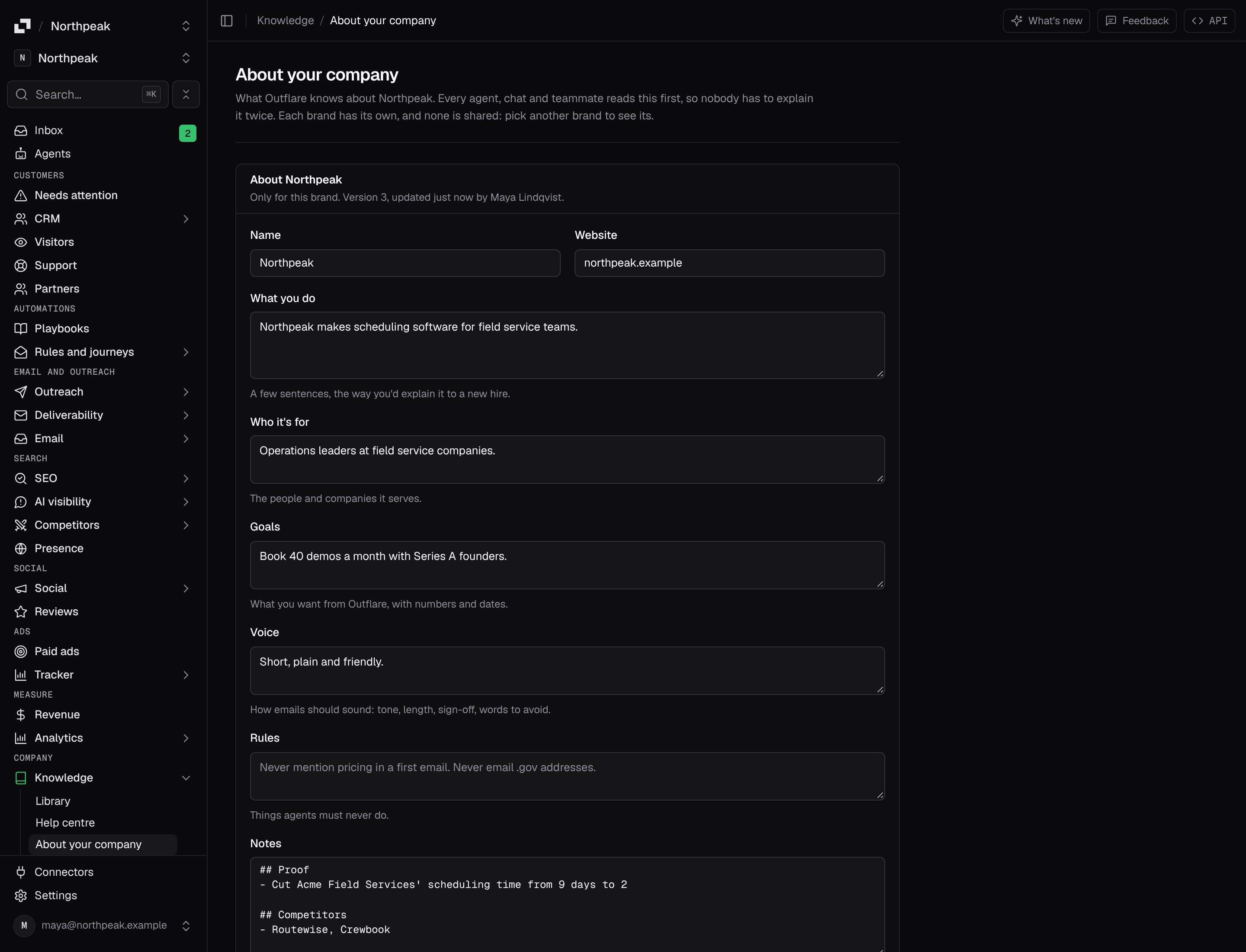
Until the company name, what you do, goals and voice are filled in, agents ask for them once. Press Don’t ask again if you’d rather they didn’t.
In Claude, ChatGPT and Cursor
Section titled “In Claude, ChatGPT and Cursor”The MCP server tells every agent to start with get_context. One call returns the company context, pinned and recent memories, your brands and the workspace status. The agent asks only for what is missing, saves your answers with update_context, and saves anything lasting you say with remember.
Try these in any connected client:
- “Set up Outflare for my company.” Runs a short interview (the
set_up_outflareprompt) and fills in what is missing. - “What’s blocking my outreach?” Walks every blocker (the
whats_blockedprompt). - “Remember we never email agencies.” Saves a memory.
Outflare’s own mission agent reads the same context and pinned memories every turn, writes in your voice, and keeps to your rules.
What is blocked, and who fixes it
Section titled “What is blocked, and who fixes it”get_status (and GET /v1/workspaces/{ws}/status) lists everything stopping the workspace, worst first:
| Blocker | Who acts |
|---|---|
| No mailboxes, or none ready to send yet | You, or wait for warm-up |
| Mailboxes that can’t sign in | You reconnect them |
| Domains with critical problems, paused sending servers | You fix DNS or the blocklist |
| Connections that stopped working, connect links waiting | You reconnect, from the link the agent gives you |
| Mission changes waiting for approval, paused missions | You approve or resume |
| Sequences short of mailboxes | The agent looks into it |
| Infrastructure plans awaiting approval | You approve: it spends money |
| Unread replies | The agent triages them |
| Company details still missing | The agent asks you once |
| Open errors on the fixes list | The agent takes them, or hands one to a coding agent |
| Analytics sites with no brand, brands no analytics tool reads | You map the site or connect the tool |
| Email sending domains the provider wouldn’t verify, broadcasts that stopped | You add the DNS records; the agent finds out why a broadcast stopped |
| Social replies waiting for approval | You approve or reject them: nothing posts without you |
| Possible duplicate people, new product event names that look like a typo | The agent merges, links or dismisses the people, and asks you whether each event name is a typo |
| CRM imports that failed | The agent runs the import again |
Each blocker names the tool an agent calls next, the dashboard page that fixes it, and whether the agent or a person has to act. Home shows the same list, under For you today and, for set-up and connections, Needs setup, so there is one place for every module’s to-dos.
When a call fails, the agent gets the error code and a plain next step (for example, which scope to add to its token), so it fixes the cause or tells you exactly what to do instead of retrying blindly.
Over the API and CLI
Section titled “Over the API and CLI”# What an agent reads at the start of a conversationcurl "$OUTFLARE_URL/v1/workspaces/$WS/context" -H "Authorization: Bearer $TOKEN"
# Save the company's voicecurl -X PATCH "$OUTFLARE_URL/v1/workspaces/$WS/context" -H "Authorization: Bearer $TOKEN" \ -H "Content-Type: application/json" -d '{"voice": "Plain and short. Sign off with first name."}'
# Remember a decisioncurl -X POST "$OUTFLARE_URL/v1/brands/$BRAND/memories" -H "Authorization: Bearer $TOKEN" \ -H "Content-Type: application/json" -d '{"text": "Only target Series A and later", "kind": "decision"}'
# What is blockedoutflare get-statusReading needs the workspace.read scope. Editing the context and memories needs context.manage, which Can make changes on a token includes. An edit sent with an old version fails with 409 context_changed, so a person and an agent never overwrite each other.