

Plan domains and mailboxes
Shipped Infrastructure plans with suggested names and a timeline, buying by hand or through a supplier, DNS and connection checks, and a stage for every mailbox.
Cold email needs domains that are not your main one, mailboxes on them, DNS that proves they are yours, and two weeks of warm-up before the first sequence. An infrastructure plan is all of that as one request: say how many, for whom and by when, approve it once, and Outflare builds it and keeps each mailbox healthy afterwards. A person can do it in the web app, and an agent can do the same over the API or MCP.
Make a plan
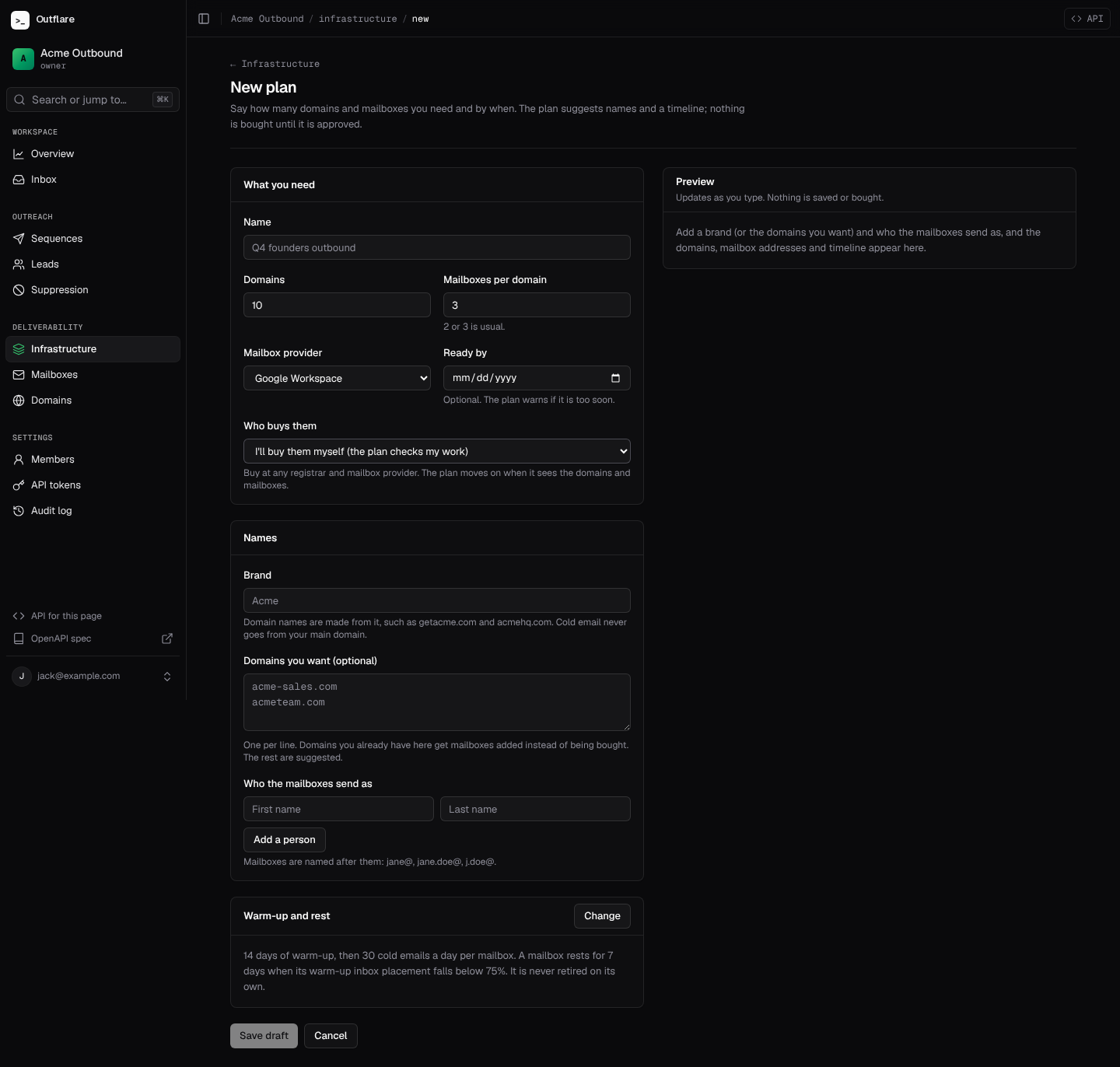
Section titled “Make a plan”Open Infrastructure → New plan and fill in:
| Field | What it does |
|---|---|
| Domains, mailboxes per domain | How many. 2 or 3 mailboxes per domain is usual; more puts a lot on one name, and the plan warns you. |
| Mailbox provider | Google Workspace or Microsoft 365. |
| Ready by | Optional. The plan warns you if the date is too soon and says what would make it, such as a shorter warm-up or a later date. |
| Who buys them | You, at any registrar and provider, or a supplier connector. |
| Brand | Domain names are suggested from it: getacme.com, acmehq.com, tryacme.com, .com first. Names you already have in the workspace are skipped. |
| Domains you want | Optional. Your own picks come first and the rest are suggested. A domain you already have here gets mailboxes added instead of being bought. |
| Who the mailboxes send as | One or more people. Mailboxes are named after them, most natural first: jane@, jane.doe@, j.doe@. |
| Warm-up and rest | 14 days of warm-up by default (7 to 60), the daily limit once ready, the inbox placement below which a mailbox rests (75%), and optionally retiring a mailbox that never recovers. |
The preview updates as you type and saves nothing. It shows every domain and mailbox, when buying and DNS should be done, the earliest date every mailbox can be ready, how many cold emails a day they will send, and any warnings. Blocking warnings, such as no one to send as, must be fixed before the plan can be approved.
Save it as a draft. A draft buys nothing and can be edited or deleted. If the plan belongs to a project, its domains and mailboxes join that project.
Approve and build
Section titled “Approve and build”Approving a plan is the one step that spends money, so it needs the infrastructure.approve scope: owners and admins in the web app, or a token you gave that scope on purpose. After that the plan builds itself, step by step, and the plan page shows where each domain and mailbox is and what it is waiting for.
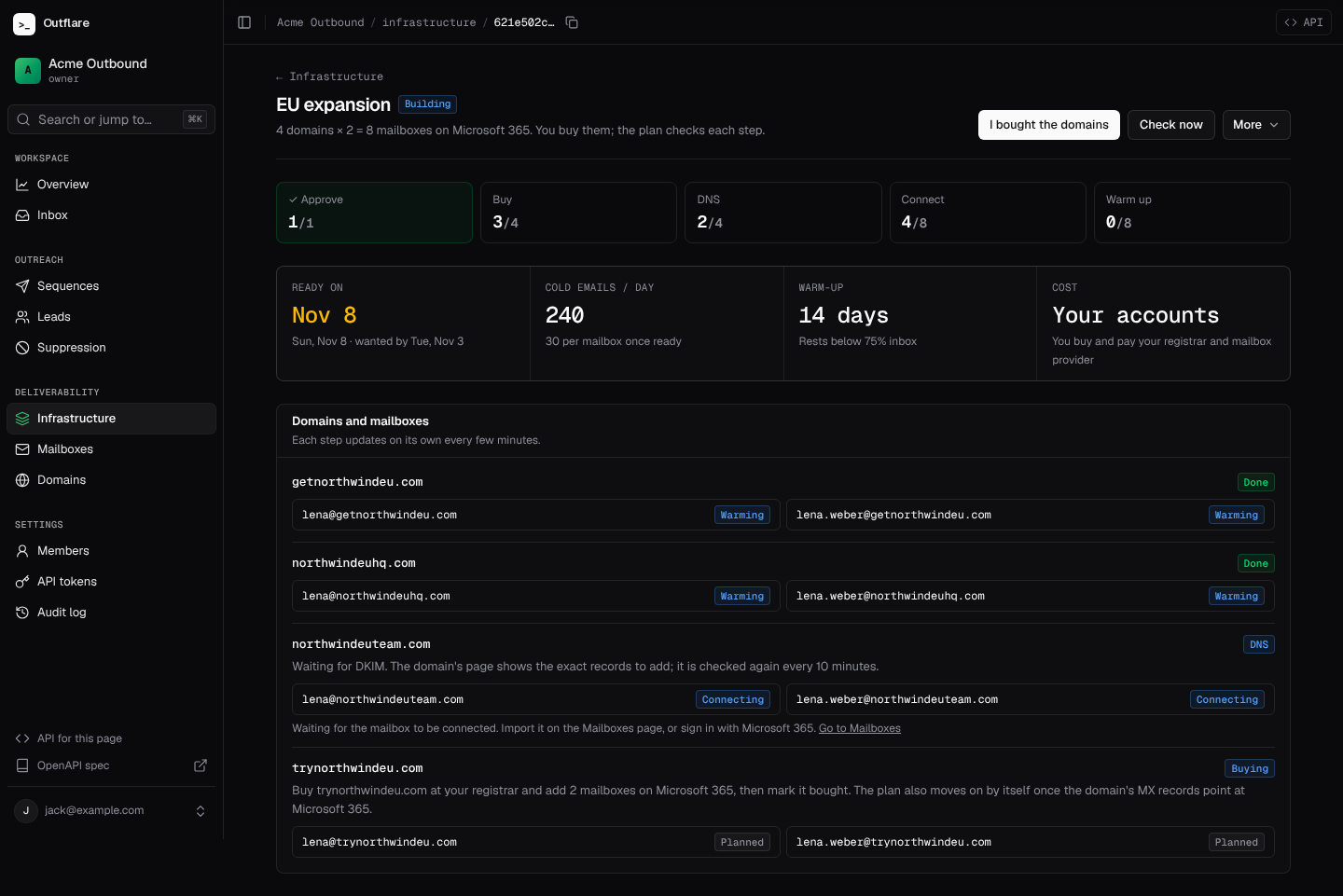
- Buy. The domains and mailboxes are bought in your own accounts. Outflare never resells them: you pay your registrar and mailbox provider directly.
- DNS. The plan checks each domain every 10 minutes until its MX records point at the provider and it has SPF and DKIM. A domain waiting here says which record is missing, and its page under Sending domains shows the exact records to add.
- Connect. Each mailbox is linked as soon as one with its address is connected, whether by Google or Microsoft sign-in, an upload or a supplier.
- Warm up. A linked mailbox starts warming, with warm-up on and the plan’s daily limit set. The plan is done when every mailbox is ready.
Buy them yourself
Section titled “Buy them yourself”No connection is needed. Buy the domains wherever you like and add the mailboxes, then press I bought the domains, or don’t: the plan also moves on by itself once a domain’s MX records point at Google or Microsoft. Connect or upload the mailboxes on the Mailboxes page and the plan picks them up by address.
Buy through a supplier
Section titled “Buy through a supplier”With a supplier connector such as Cheap Inboxes, the plan asks the supplier for a price and which names are free before you approve, and shows both on the plan. Approving places the order once, on your own supplier account, for exactly the price you saw: the approval carries that price (once_cents and monthly_cents over the API), and if the quote has changed since, approval is refused with price_mismatch so you can look again. An order is never placed twice, even if the engine restarts mid-order; if it fails, the plan says why and nothing is retried. Mailboxes the supplier creates are imported and linked as they appear.
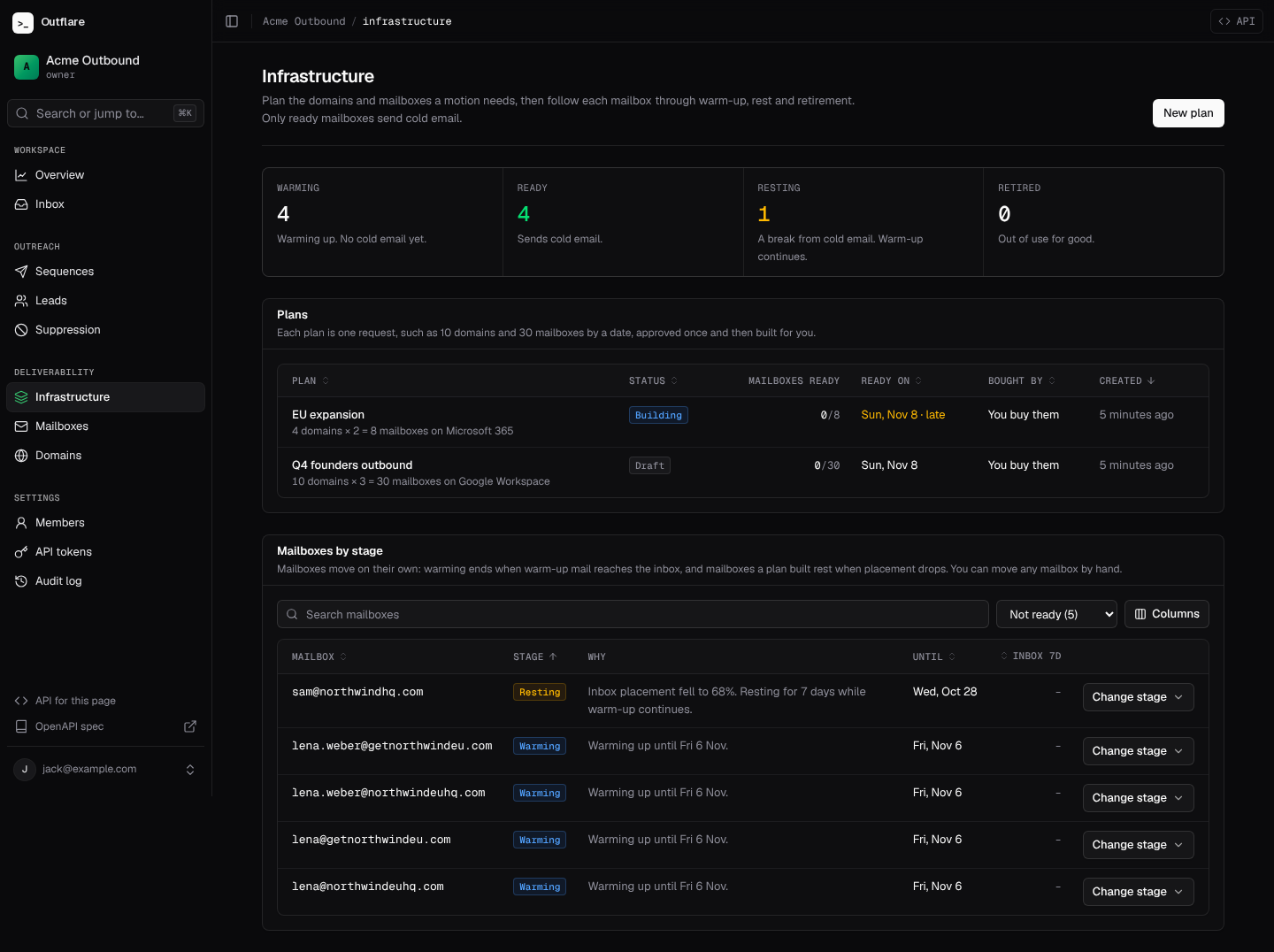
Mailbox stages
Section titled “Mailbox stages”Every mailbox has a stage, shown in its own column on the Mailboxes page and grouped on Infrastructure:
| Stage | Cold email | What happens |
|---|---|---|
| Warming | No | Warm-up runs. It moves to ready once warm-up is done, at least 20 warm-up emails were placed in the last 7 days, and at least 85% of them reached the inbox. |
| Ready | Yes | Sends for its sequences. If its 7-day inbox placement falls below the plan’s floor (75%), or its domain has a critical issue such as a blocklist, it rests. |
| Resting | No | A 7-day break from cold email while warm-up continues. It comes back on its own when placement recovers; if not, the rest is extended 3 days at a time, and the plan can retire it after a number of days you choose. |
| Retired | No | Out of use for good: paused, warm-up off. Its follow-ups are treated like those of a deleted mailbox, which you can cancel or hand to another one. |
Only ready mailboxes send cold email. The policy check waits on any other (mailbox_not_ready), and mailbox allocation skips them and says why, such as “mailbox is resting until Mon 2 Nov”. Each move is in the audit log as mailbox.stage_changed with its reason.
Mailboxes added outside a plan start ready and never move on their own, so existing setups keep sending. To bring one into the cycle, move it by hand: on Infrastructure or the Mailboxes page, use Change stage to start warming, rest until a date, make ready or retire, with a reason. Retired is final; a retired mailbox comes back only by connecting it again.
Over the API
Section titled “Over the API”# Try a goal without saving itcurl -X POST https://outflare.example.com/v1/workspaces/$WS/infrastructure/preview \ -H "Authorization: Bearer $OUTFLARE_TOKEN" -H "Content-Type: application/json" \ -d '{"domain_count": 10, "mailboxes_per_domain": 3, "brand": "Acme", "provider": "google", "personas": [{"first_name": "Jane", "last_name": "Doe"}], "ready_by": "2026-11-14"}'
# Save it as a draft, then approve itcurl -X POST https://outflare.example.com/v1/workspaces/$WS/infra-plans \ -H "Authorization: Bearer $OUTFLARE_TOKEN" -H "Content-Type: application/json" \ -d '{"name": "Q4 founders", "domain_count": 10, "mailboxes_per_domain": 3, "brand": "Acme", "provider": "google", "personas": [{"first_name": "Jane", "last_name": "Doe"}]}'curl -X POST https://outflare.example.com/v1/workspaces/$WS/infra-plans/$PLAN/approve \ -H "Authorization: Bearer $OUTFLARE_TOKEN"
# Every mailbox by stage, and moving some by handcurl https://outflare.example.com/v1/workspaces/$WS/infrastructure -H "Authorization: Bearer $OUTFLARE_TOKEN"curl -X POST https://outflare.example.com/v1/workspaces/$WS/infrastructure/move \ -H "Authorization: Bearer $OUTFLARE_TOKEN" -H "Content-Type: application/json" \ -d '{"mailbox_ids": ["'$MAILBOX'"], "stage": "resting", "until": "2026-11-20T00:00:00Z", "reason": "Spam complaints"}'Other endpoints: PATCH and DELETE /infra-plans/{id} for drafts, POST /infra-plans/{id}/bought to say domains are bought, /refresh to check every step now, and /cancel to stop a plan (mailboxes already built are kept). GET /mailboxes?stage=resting filters mailboxes by stage, and every mailbox carries a lifecycle object with its stage, reason and until. See the API reference for every field.
| Scope | Lets a token |
|---|---|
infrastructure.read |
See plans and mailbox stages, and preview a plan. |
infrastructure.manage |
Draft, change and cancel plans, mark domains bought, move mailboxes between stages. |
infrastructure.approve |
Approve a plan, which buys domains and mailboxes on your accounts. Owners and admins only by default. |
Agents get the same through the MCP server: preview_infra_plan, create_infra_plan and get_infra_plan to plan, approve_infra_plan when the token may spend, and get_infrastructure and move_mailboxes to keep mailboxes healthy.