

Warm up mailboxes
Shipped Warm-up between your own mailboxes, with a daily ramp, spam rescue and replies, and inbox placement per mailbox and per domain.
A new inbox that sends cold email straight away lands in spam. Google and Microsoft trust a mailbox once it has a history of sending mail that people open, rescue from spam and reply to. Warm-up builds that history for you, before your first sequence and for as long as you keep it on.
How it works
Section titled “How it works”When warm-up is on, your mailboxes email each other:
- A slow ramp. A mailbox sends 2 warm-up emails on its first day and 2 more each day after that, up to its daily target (20 by default). Sends are spread over the day.
- Natural mail. Each email is a short, plain note between colleagues, written fresh from varied parts. Nothing in it marks it as warm-up: the receiving mailbox recognises it by the Message-ID the engine recorded when it sent it.
- Engagement. About every 20 minutes the receiving mailbox looks for its warm-up mail in the inbox and the spam folder. It marks each message read, moves it to the inbox if it landed in spam, and answers some of them (30% by default) a few minutes to an hour and a half later, in the same thread.
- Placement. Where each message landed is recorded: inbox, spam, or missing if it never arrived within two days.
Warm-up mail never shows in your Inbox, doesn’t count towards daily limits, and isn’t in your sending stats. It only goes between the active mailboxes of one workspace, and never to an address on your suppression list.
Turn it on
Section titled “Turn it on”In the web app, open Mailboxes. Until any mailbox is warming, the page offers Warm up N mailboxes for all of them. Afterwards, each mailbox’s menu has Turn on warm-up and Turn off warm-up. Mailboxes that need attention are left out until they are fixed.
Over the API, turn it on for chosen mailboxes, a whole pool, or every mailbox in the workspace:
# Every mailbox in a pool. Leave out pool_id for all, or send mailbox_ids instead.curl -X POST https://outflare.example.com/v1/workspaces/$WS/mailboxes/warmup \ -H "Authorization: Bearer $OUTFLARE_TOKEN" -H "Content-Type: application/json" \ -d '{"enabled": true, "pool_id": "'$POOL'", "daily_target": 20, "reply_rate": 30}'The answer is {"updated": 12}. One mailbox can also be changed with PATCH /v1/workspaces/{ws}/mailboxes/{id} and {"warmup": {"enabled": false}}.
| Setting | Field | Default | What it does |
|---|---|---|---|
| On or off | enabled |
off | Turning it on starts the ramp again from day one. |
| Daily target | daily_target |
20 | Warm-up emails a day once ramped up, 1 to 100. |
| Reply rate | reply_rate |
30 | Percent of received warm-up emails that are answered, 0 to 100. |
Plan on two weeks of warm-up before a new mailbox sends sequences, and leave it on afterwards to protect its reputation.
Read the results
Section titled “Read the results”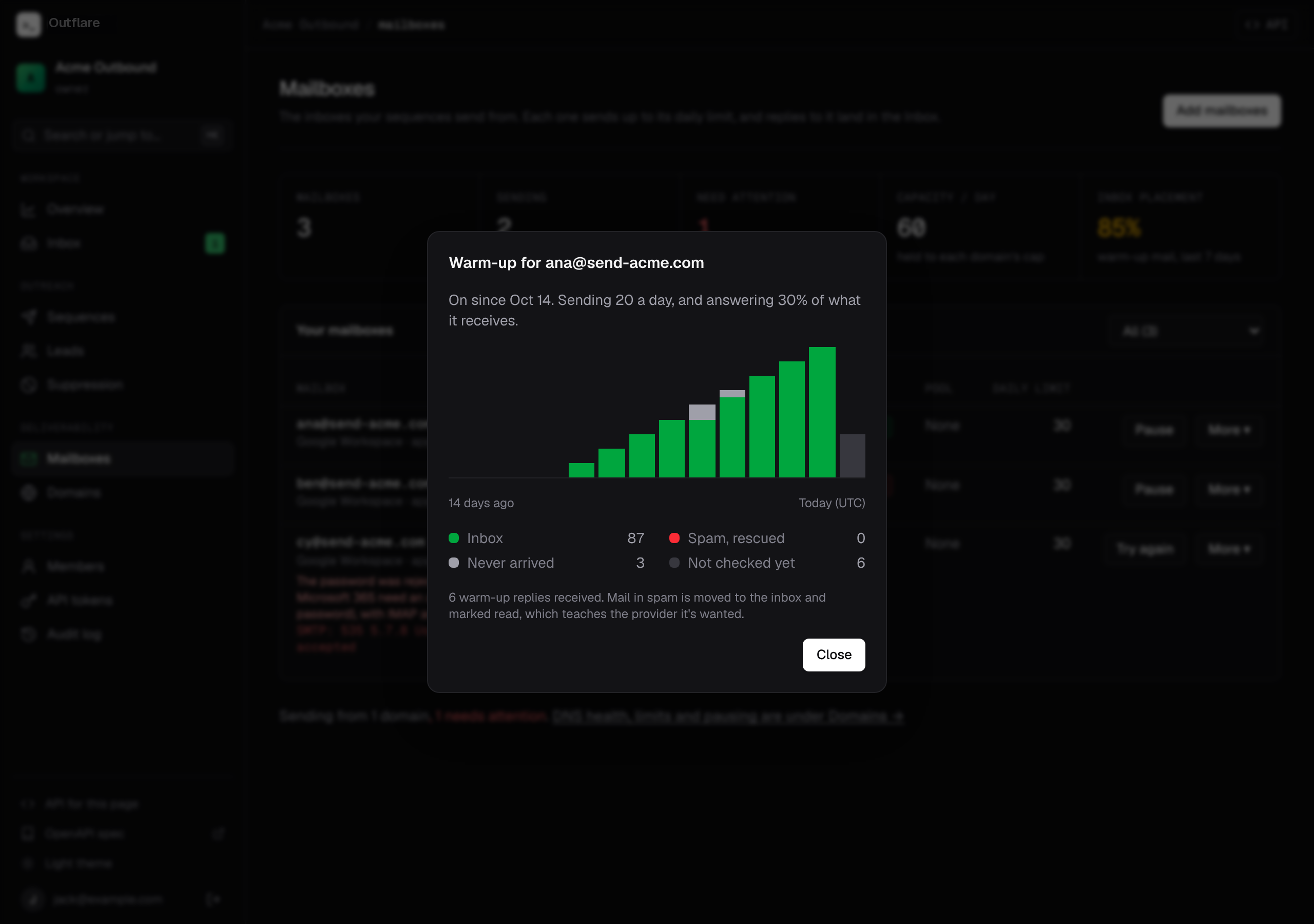
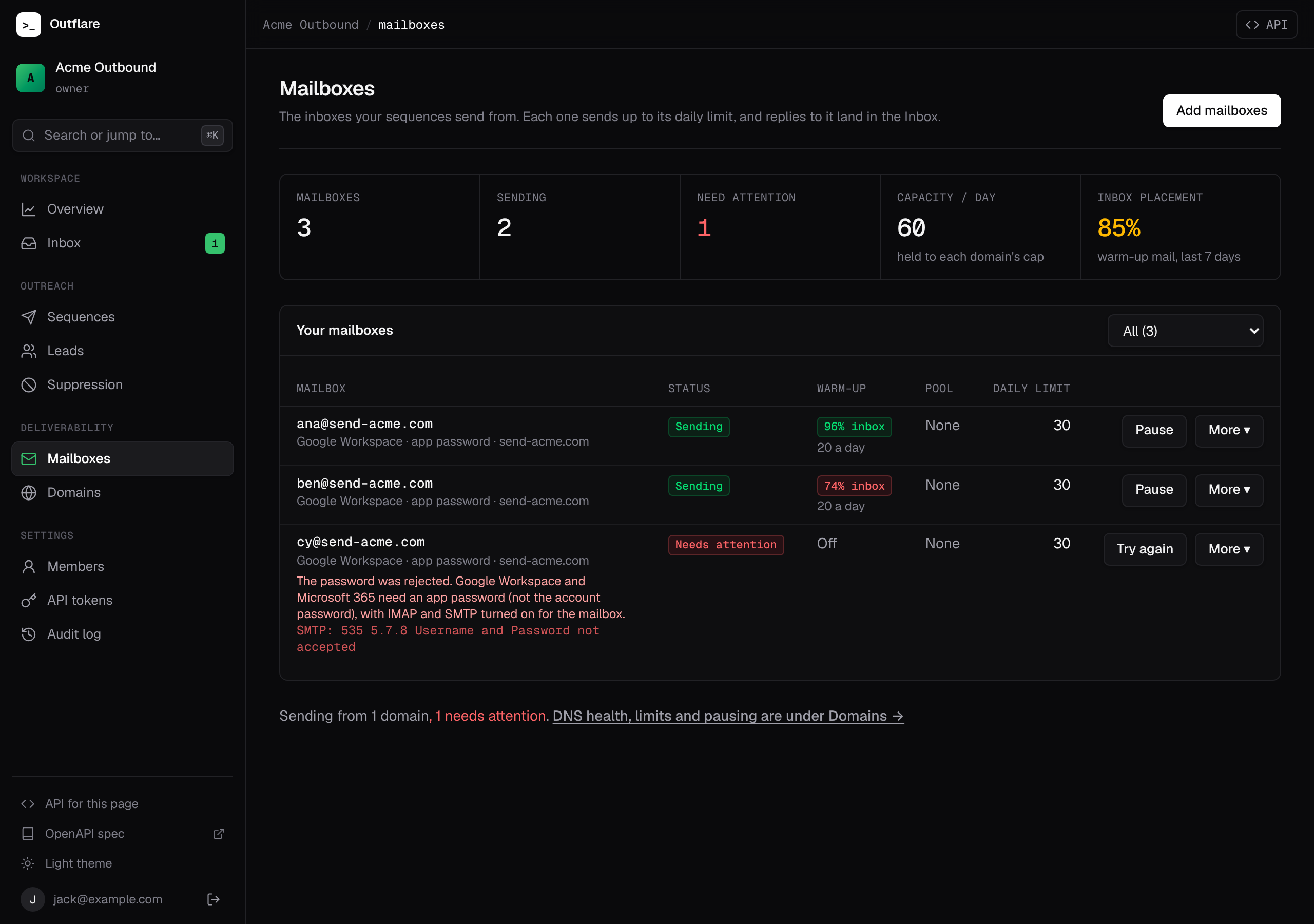
- Per mailbox. The Warm-up column on Mailboxes shows the share of the last 7 days’ warm-up mail that reached the inbox, and today’s volume on the ramp. Click it for a 14-day chart. The API returns the same as
warmupon each mailbox, and day by day fromGET /v1/workspaces/{ws}/mailboxes/{id}/warmup. - Per domain. Each sending domain sums its mailboxes’ placement. Below 90% it raises an
inbox_placementwarning, and below 75% a critical issue, each with what to do. - Workspace. The Mailboxes page shows overall Inbox placement, and the overview warns when it drops below 75%.
GET /v1/workspaces/{ws}/statsreturns it aswarmup_inbox_rate.
| Placement | What to do |
|---|---|
| 90% or more | Healthy. Keep warm-up on alongside your sequences. |
| 75% to 90% | Some mail lands in spam. Lower the domain’s daily limits and keep warming. |
| Under 75% | Most mail goes to spam. Pause cold sending from the domain, fix its DNS issues, and let warm-up run until placement recovers. |
For agents
Section titled “For agents”The MCP server has set_warmup, which takes the same settings as the API, and get_mailbox_warmup for a mailbox’s 14-day history. list_mailboxes includes each mailbox’s warm-up results, so an agent can check a mailbox is ready before adding it to a sequence’s pool.