

AI models
Shipped Claude, OpenAI, Gemini, Mistral, xAI, DeepSeek and three routers (OpenRouter, Vercel AI Gateway, Requesty), a model picker, and a monthly AI limit.
Outflare plans missions from a goal and runs its own agent with an AI model you connect, using your own API key. Usage is billed by the provider, to your account. Every workspace brings its own key: Outflare never supplies, pays for or shares one. You don’t need one to use Outflare: your own agent over MCP or the API needs no model here at all.
Pick a provider and a model
Section titled “Pick a provider and a model”- Open Connectors and connect one of the AI providers with its API key: Claude (Anthropic), OpenAI, Gemini (Google AI Studio), Mistral, xAI (Grok), DeepSeek (hosted in China), or a router: OpenRouter, Vercel AI Gateway or Requesty, each one key for many vendors’ models. The key is checked with the provider before it is saved. OpenRouter also lets you sign in instead: you approve on OpenRouter’s page and it makes a key on your own account for Outflare, so there’s nothing to copy.
- Open Settings, General, and find AI model. Choose the provider and pick a model. The list comes live from the provider, with only the chat models your key can use.
- Save. The Missions page then says which model it uses, with a link to change it.
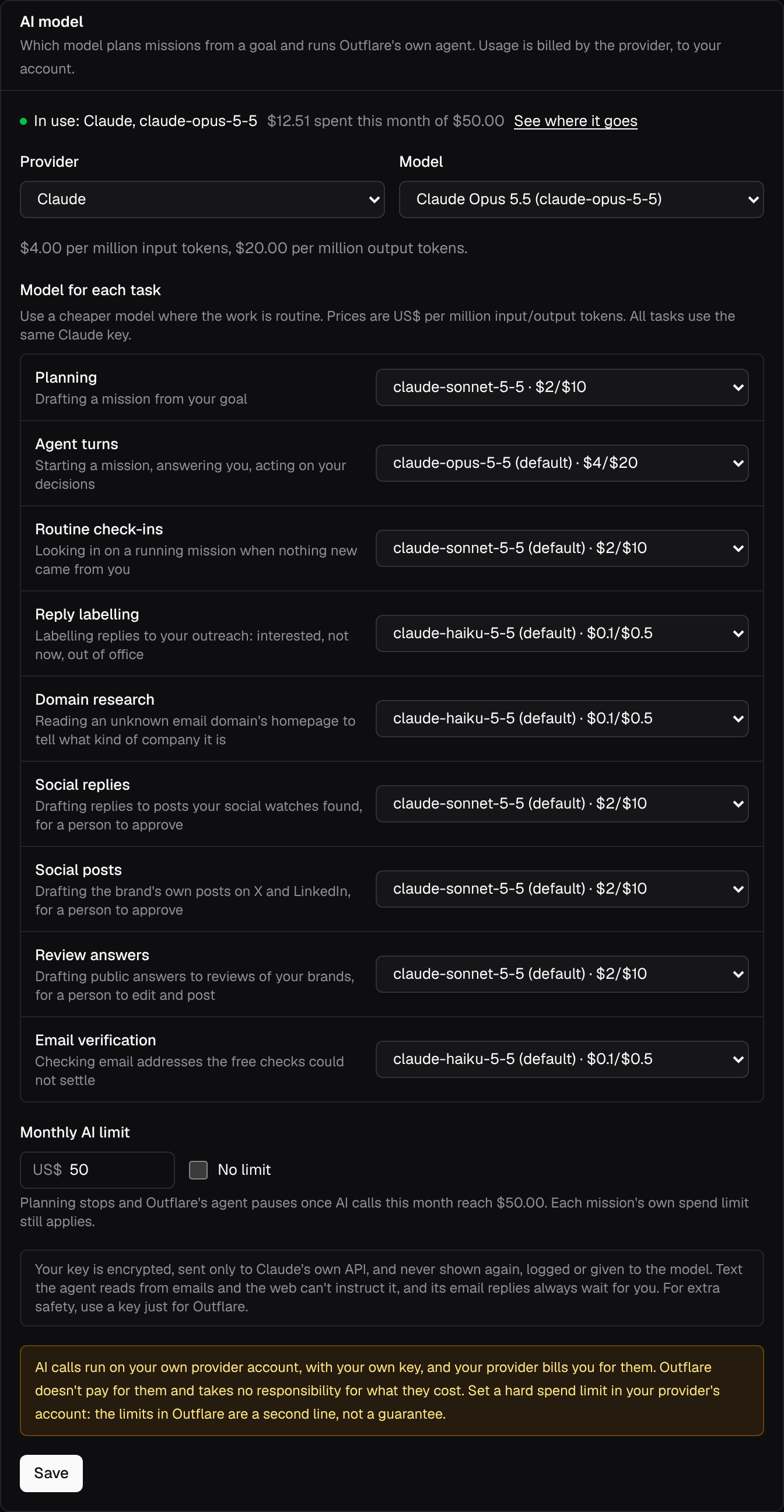
With no choice saved, Outflare uses the first connected provider in the order above with its default model. Only Claude has one (Claude Opus 5.5); for the others you pick, because their line-ups change too often to guess.
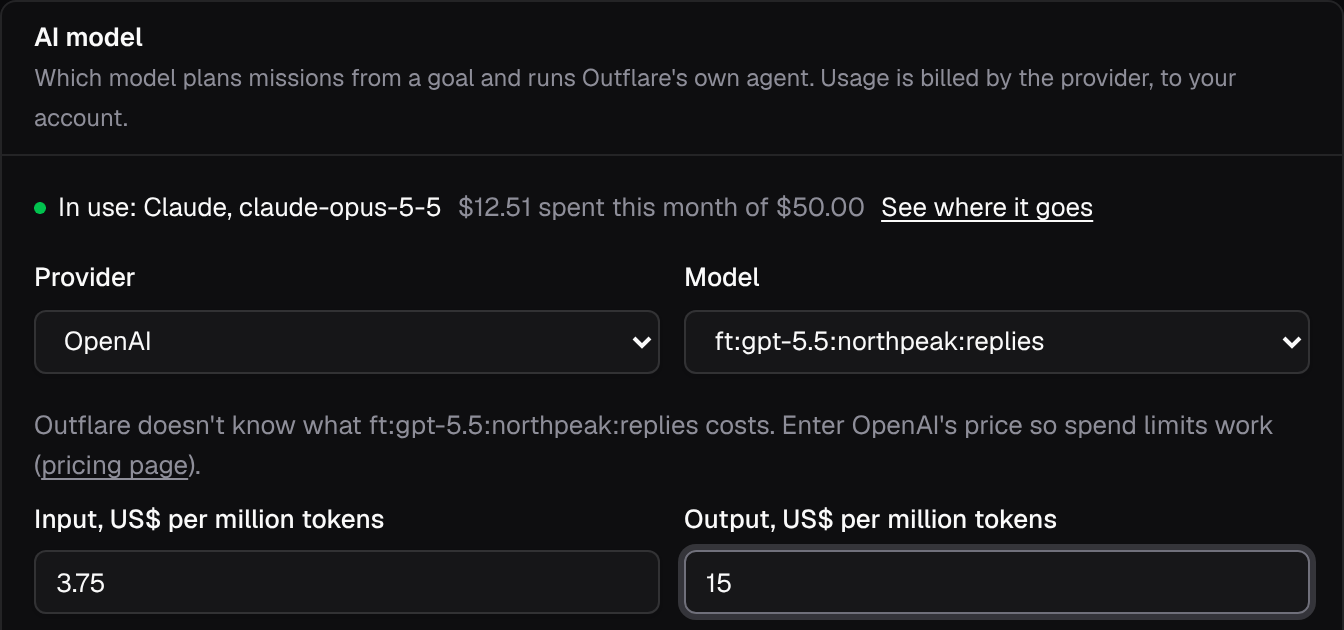
Outflare knows the list price of Claude models, and OpenRouter reports the cost of every call. For a model it doesn’t know, enter the provider’s price in US$ per million input and output tokens, from the pricing page linked in the form. Prices are needed so spend limits work.
Routers and subscription plans
Section titled “Routers and subscription plans”On the Connectors page, AI models carry tags:
- Router: OpenRouter, Vercel AI Gateway and Requesty reach models from many vendors (Claude, GPT, Gemini, Llama and more) with one key, billed by the router. They’re the quickest way to try several models.
- ChatGPT plan sign-in soon (OpenAI) and SuperGrok sign-in soon (xAI): these providers let some apps use a ChatGPT Plus or Pro plan, or a SuperGrok or X Premium+ plan, instead of an API key. Outflare doesn’t offer that sign-in yet, so connect an API key for now.
- Hosted in China (DeepSeek): DeepSeek processes what Outflare sends it, including customer and lead details in prompts, on servers in China. To keep data outside China, use DeepSeek’s models through a router such as OpenRouter.
Anthropic and Google don’t let other apps use a Claude or Google AI plan, so Claude and Gemini take an API key only. To use a Claude or ChatGPT plan you already pay for today, connect Claude or ChatGPT to Outflare and run Outflare from that app: it needs no key here.
A model for each task
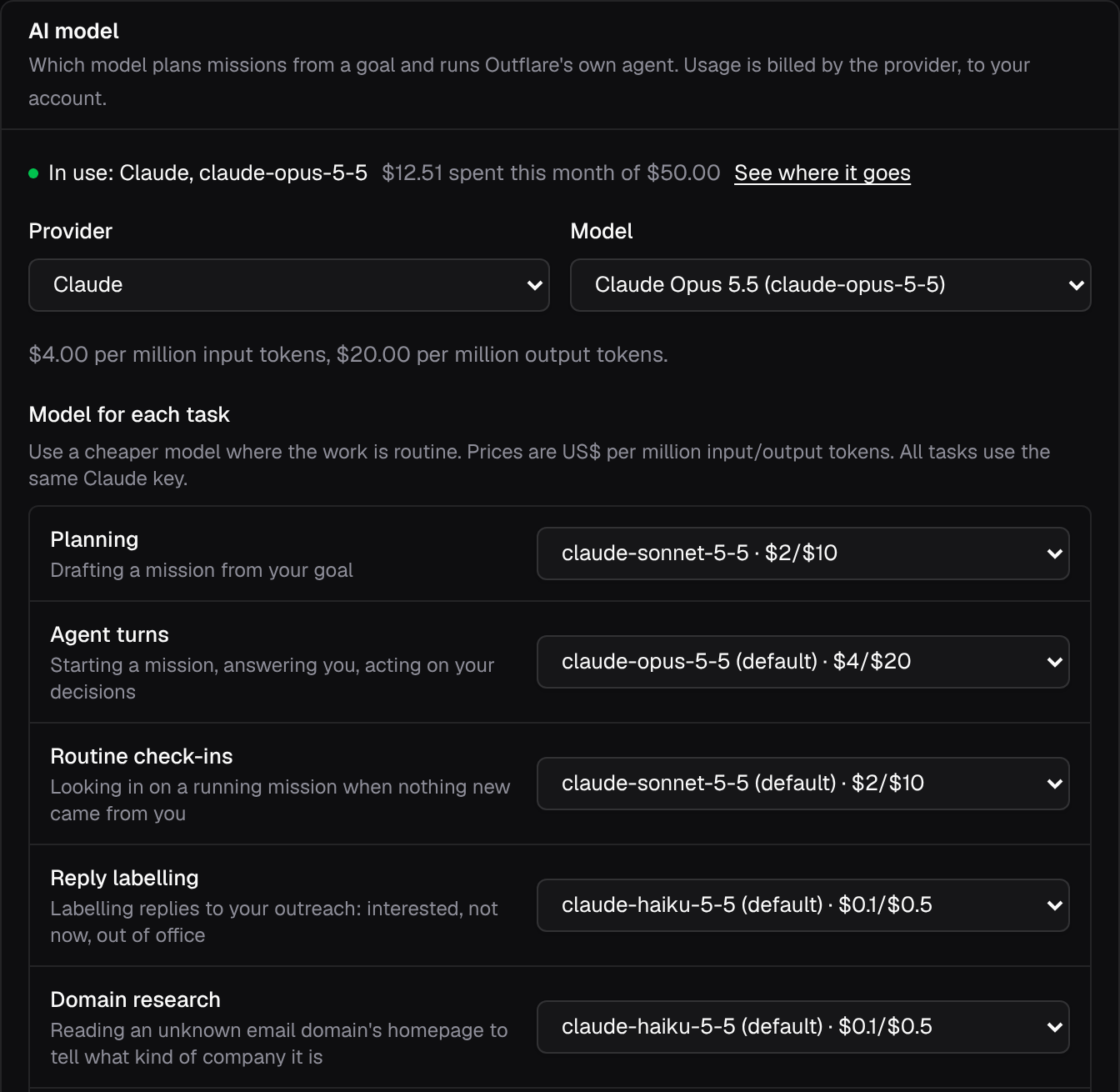
Section titled “A model for each task”Not every task needs the strongest model. Under Model for each task you can pick a different model, on the same key, for:
| Task | What it is | Default |
|---|---|---|
| Planning | Drafting a mission from your goal | The main model |
| Agent turns | Outflare’s agent starting a mission, answering you, acting on your decisions, or carrying on after you resume it | The main model |
| Routine check-ins | Looking in on a running mission when nothing new came from you | The provider’s cheaper model, when it costs less: Claude Sonnet 5.5 under Claude Opus 5.5 |
| Reply labelling | Labelling replies to your outreach that the built-in rules can’t place: interested, not now, out of office and so on | The provider’s cheapest model: Claude Haiku 5.5 |
| Domain research | Reading an unknown email domain’s homepage to classify it | The provider’s cheapest model: Claude Haiku 5.5 |
| AI visibility | Reading what AI models answer about your brands, such as checking answers against your brand’s facts. The questions themselves go to the models you pick for AI visibility | The provider’s cheaper model: Claude Sonnet 5.5 under Claude Opus 5.5 |
| Email verification | Checking email addresses the free checks could not settle | The provider’s cheapest model: Claude Haiku 5.5 |
| Event name check | Comparing new event names your product sends with the ones it already sends, to ask you only when one looks like a typo | The provider’s cheapest model: Claude Haiku 5.5 |
| Fix tickets | Writing fix tickets from site audits and other findings, for your team or your coding agent | The provider’s cheaper model: Claude Sonnet 5.5 under Claude Opus 5.5 |
| PR stories | Suggesting story ideas, drafting press releases from a story’s facts and approved quotes, writing pitch openers and reading journalists’ replies | The provider’s cheaper model: Claude Sonnet 5.5 under Claude Opus 5.5 |
The cheaper defaults are Claude’s; with another provider every task uses the main model until you pick one. Each list shows what the model costs, in US$ per million input/output tokens, and every call is priced at its own model’s price. A choice belongs to the provider it was made for: switch provider and the tasks go back to their defaults.
Limit what AI can spend
Section titled “Limit what AI can spend”- Monthly AI limit for the workspace, across every plan and every turn of Outflare’s agent: US$50 a month by default, or no limit. Once it is reached, planning answers
409withai_budget_reachedand running missions pause and say why. - Each mission’s own spend limit still applies, and every plan and turn is recorded in the mission’s spend.
- A limit per tool, such as reply labelling or social replies, on top of the workspace’s. See where each tool’s spend goes and set its limit under AI usage. Owners and admins are emailed at 80% of a limit and when it is reached.
- Set a limit with the provider too. Your provider bills your account for every call, and Outflare takes no responsibility for that spend. The provider’s limit is the only one that holds whatever happens, so we recommend a key made just for Outflare with a hard spend limit on it. Outflare asks you to confirm this when you connect a model.
How your key is kept safe
Section titled “How your key is kept safe”- Encrypted at rest with your instance key, bound to that connection, and deleted with it.
- Sent only to the provider’s own API. The addresses are fixed in Outflare; no workspace setting can point a key somewhere else, and redirects are never followed. Only whoever runs the server can route calls through a gateway (see below).
- Never shown again. Keys are never returned by the API, written to logs, events or the audit log, or given to the model. Error messages from a provider are cleaned of anything that looks like a key before you see them.
- The right key in the right box. An Outflare token pasted into any connector is refused, and a key that is plainly another provider’s (say a Gemini key in the OpenAI box) is refused before anything is sent.
How the agent is kept on course
Section titled “How the agent is kept on course”Outflare’s agent reads text written by people outside your workspace: email replies, lead fields, web pages and data from connected tools. Some of it may try to give the agent orders. So:
- The agent is told that only the people in the mission instruct it, and that everything it reads is data.
- Whatever the model decides, Outflare holds the changes that could send data out or change where mail goes, even in autonomous mode, until a person approves them: email replies and test sends, adding or changing mailboxes, sending servers, senders and sign-ins, webhooks, suppressions, connectors, API tokens and the company context.
- Its token is limited to operator scopes and can never approve missions, manage members or create tokens.
Over the API and MCP
Section titled “Over the API and MCP”| Endpoint | MCP tool | What |
|---|---|---|
GET /v1/workspaces/{ws}/ai-settings |
get_ai_settings |
The model in use, the connected providers, this month’s spend and what’s missing |
PUT /v1/workspaces/{ws}/ai-settings |
update_ai_settings |
Choose the connection and model, a model per task (task_models: plan, turn, check_in, reply_labelling, classify_domain, ai_visibility, social_replies, email_verification, fix_tickets, pr_stories), prices and the monthly limit |
GET /v1/workspaces/{ws}/integrations/{id}/models |
list_ai_models |
The models a connection’s key can use |
curl -X PUT "$OUTFLARE_URL/v1/workspaces/$WS/ai-settings" \ -H "Authorization: Bearer $TOKEN" -H "Content-Type: application/json" \ -d '{"integration_id": "8b1f0c2e-6a4d-4e3b-9c71-2f5d8e0a1b34", "model": "claude-sonnet-5-5", "monthly_limit_cents": 5000}'Reading the settings needs integrations.read; changing them needs integrations.manage. When planning can’t run, the error says why: connector_needed (no provider connected), ai_model_needed (pick a model or enter its price) or ai_budget_reached.
Self-hosting
Section titled “Self-hosting”Nothing to set: each workspace brings its own key. To send every call through your own gateway, set ANTHROPIC_BASE_URL, OUTFLARE_OPENAI_BASE_URL, OUTFLARE_GEMINI_BASE_URL or OUTFLARE_MISTRAL_BASE_URL. These apply to the whole server, and the gateway sees the keys, so only use one you control. Your own ANTHROPIC_API_KEY in the server’s environment is never used for a workspace’s calls.